How to Repair a PDF: Step-by-Step Guide with Screenshots
Learn how to fix damaged or corrupt PDF documents and rebuild broken xref tables in your browser. Free, fast, with no file upload to Utilvo's servers.
Launch Utilvo's local PDF repair tool with deep forensic object scanning and zero file uploads.
Why Client-Side PDF Repair Improves Privacy
Corrupt PDF documents often happen to be the most critical: quarterly financial audits, signed contracts interrupted during transfer, court records, or scanned tax filings. On conventional conversion portals, restoring a corrupt document involves transmitting unencrypted binary data across WAN links to third-party processing queues where uninspected files reside on remote storage disks.
Utilvo operates entirely inside client browser memory using modern WebAssembly and JavaScript byte stream decoders. Files remain in your browser throughout the entire recovery process, and because the repaired document is reconstructed locally in your browser, there is no need to upload corrupt files to a remote server before downloading them. This architecture eliminates transit vulnerabilities and reduces privacy risks associated with uploading sensitive documents to a third-party processing server.
Step 1: Selecting and Adding Your Corrupt PDF Document
Navigate to the Repair PDF Tool. The interface opens with an optimized drag-and-drop ingestion zone designed to accept damaged, unreadable, or truncated PDF binaries.
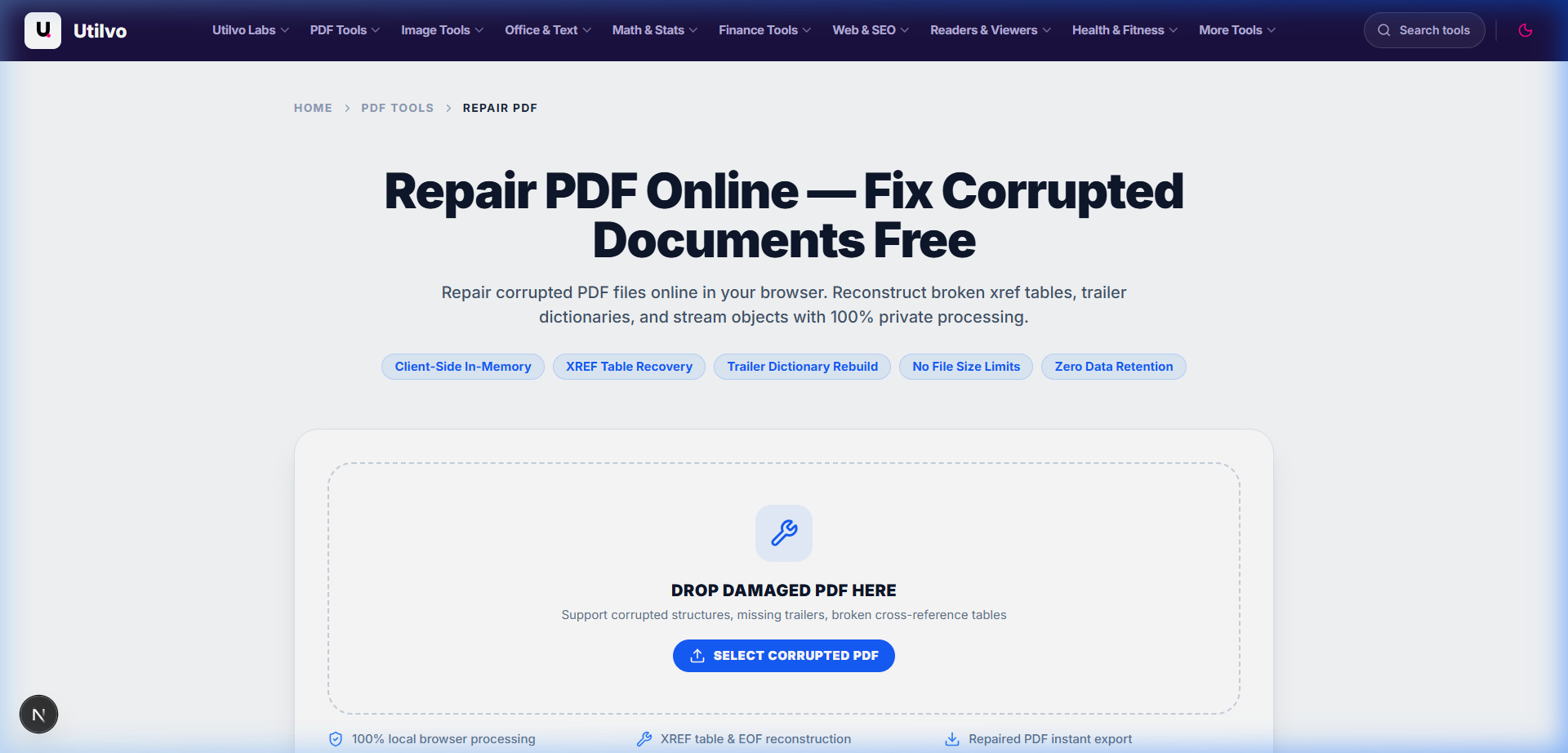
Pro Tip: Diagnosing Truncated Files Before Ingestion
If an external viewer like Adobe Acrobat or Apple Preview displays the alert The file is damaged and could not be repaired, it usually indicates that the document's trailing xref pointer (startxref) was clipped during download. Utilvo can reconstruct this pointer automatically without needing the original host server.
Step 2: Selecting Repair Mode and Running Forensic Analysis
Once your file is loaded into the browser memory sandbox, Utilvo displays the initial document telemetry: file size, byte array length, and active repair configuration. You are presented with two operational engines:
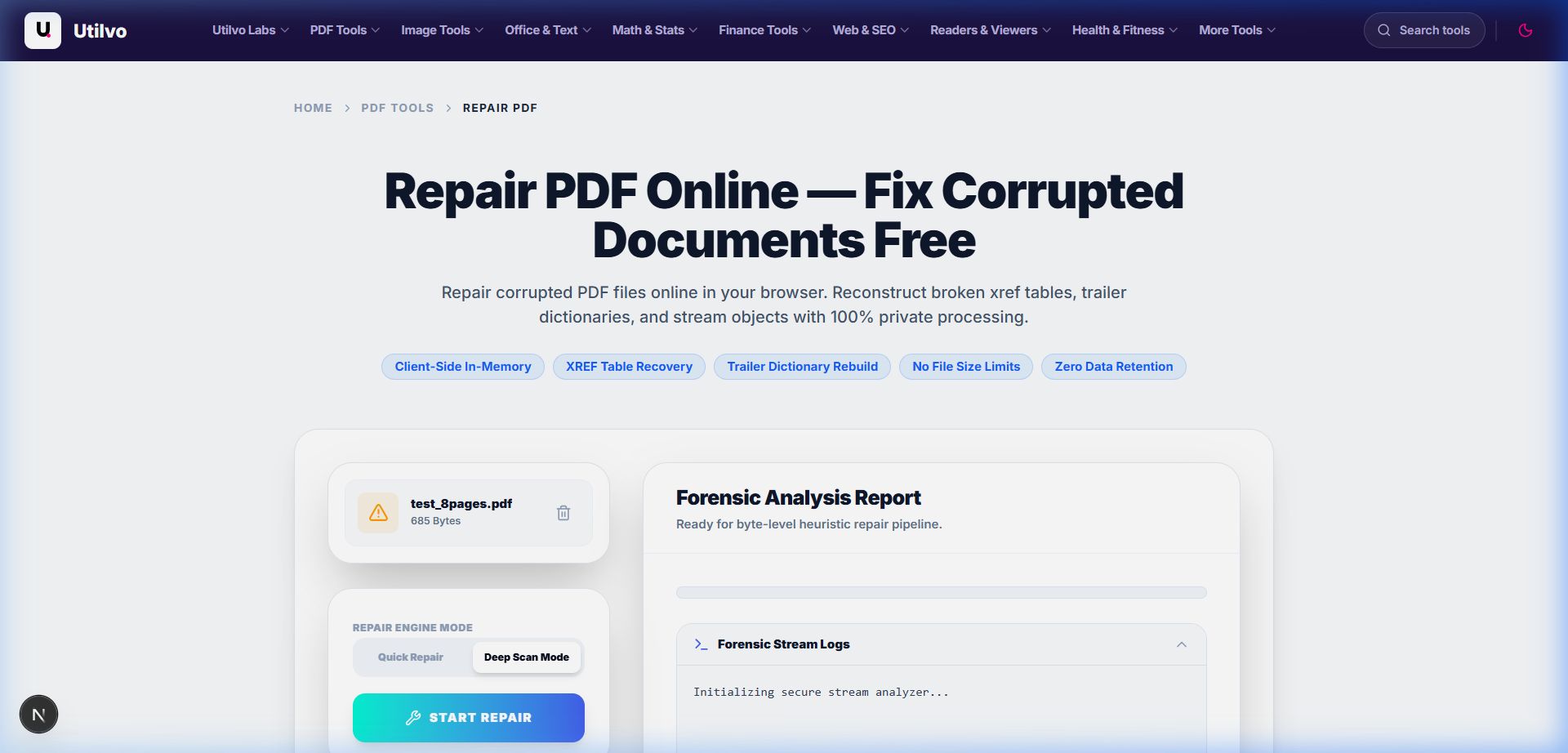
Quick Structural Healing vs. Deep Scan Reconstruction
Quick Repair inspects the trailing 2048 bytes of the file to recover displaced cross-reference tables and broken trailer pointers while maintaining existing object dictionaries. Deep Scan Reconstruction scans the entire raw binary buffer from byte 0 to EOF, identifying all indirect object definitions (obj ... endobj), validating stream lengths, and discarding corrupt tokens.
Reconstructing Broken Cross-Reference (XREF) Tables
PDF readers rely on an index table listing the exact byte position of every page, font, and graphic. If a file was saved with miscalculated byte offsets, readers abort with error codes. Utilvo calculates fresh 10-digit zero-padded byte offsets for each valid object found, compiling a pristine XREF table adhering to ISO 32000 specifications.
Synthesizing Missing Trailer Dictionaries and Catalog Pointers
If the file ends abruptly without a trailer dictionary or /Root catalog pointer, our engine locates the highest-level page tree object and dynamically synthesizes the missing catalog wrapper so modern viewers can open and index pages correctly.
Step 3: Verifying Forensic Metrics and Downloading the Repaired PDF
Click the Start Repair button. Within milliseconds, the engine completes byte-level verification, parses surviving streams, and outputs a forensic recovery summary complete with repair confidence rating.
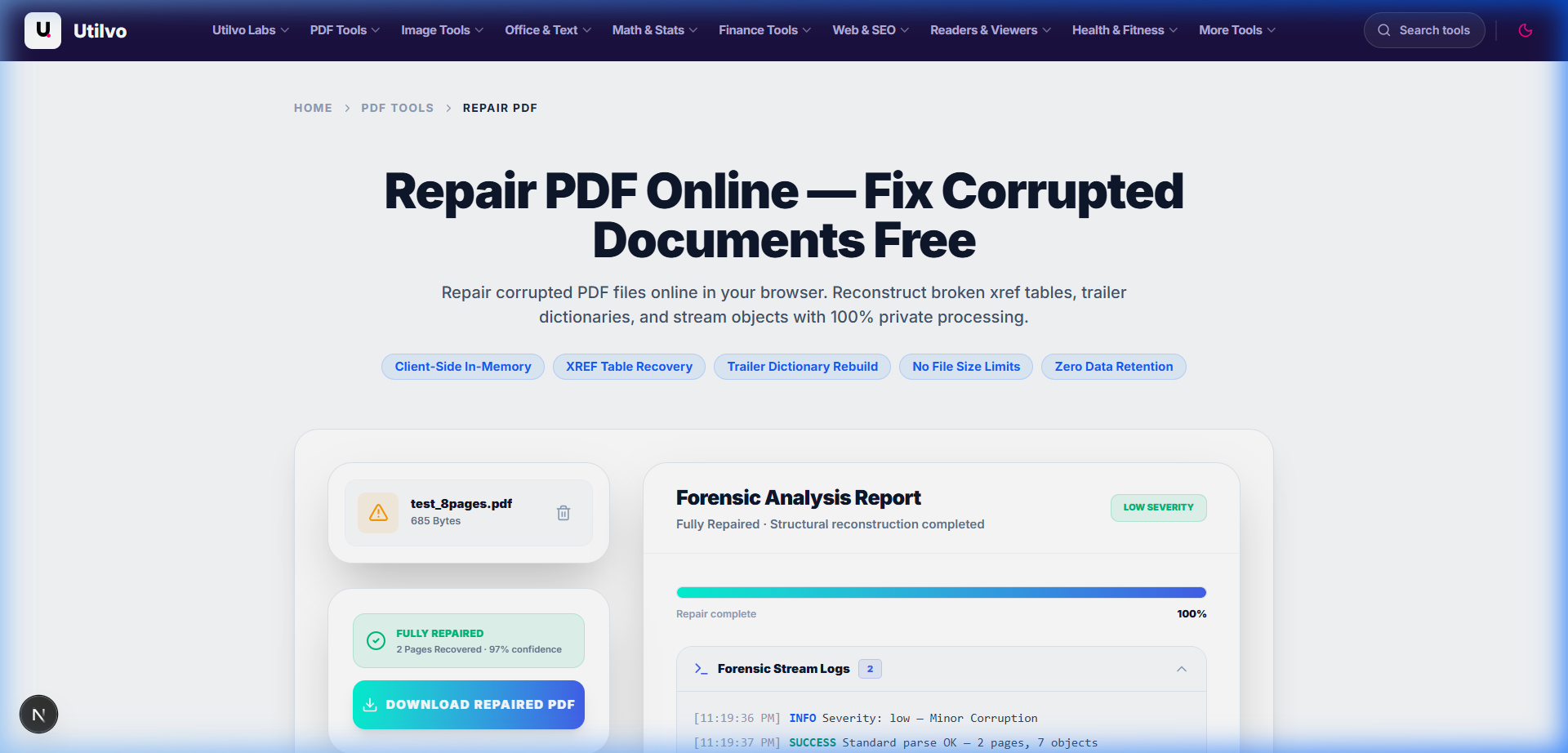
Reviewing Confidence Scores and Salvaged Stream Data
The report confirms the number of objects indexed, trailer recovery outcome, and reconstructed byte count. Click Download Repaired PDF to save your reconstructed document. If the recovered document is large or contains redundant uncompressed objects, you can immediately optimize its file size using our companion Compress PDF tool.
Technical Architecture Comparison: Local vs. Cloud PDF Repair
Evaluating client-side in-browser structural repair against traditional server-hosted recovery queues:
| File handling | Utilvo | Server-based converters |
|---|---|---|
| File upload | Files remain in your browser | Files are uploaded to a remote server |
| Processing | Client-side (WebAssembly / browser memory) | Server-side queue |
| Download | Generated locally in memory | Processed file returned from server |
| File privacy | No PDF upload to Utilvo's servers | Files stored temporarily on remote disk |
| Document limits | Generous limits bound by available device memory | Frequently capped by 25MB or 50MB file size paywalls |
Common PDF Corruption Scenarios and How to Prevent Them
Understanding why PDF files become unreadable helps you safeguard workflows and prevent recurring data loss across your team.
Incomplete Network Downloads and Truncated Stream Buffers
When a download is terminated prematurely due to Wi-Fi drops or socket timeouts, the file lacks its essential %%EOF end-of-file marker. Always check file sizes against source servers before archiving.
Corrupt Binary Offsets Caused by Legacy Email Clients
Older mail gateways that convert binary attachments through ASCII 7-bit filters often convert line-break characters (\r\n to \n). This displaces byte offsets, breaking the cross-reference table.
Password-Encrypted Files with Damaged Security Handlers
If an encrypted document suffers byte rot inside its /Encrypt dictionary, decryptors fail even with valid credentials. Use our Unlock PDF tool before running batch file migrations.
Frequently Asked Questions
Answers to common technical questions regarding client-side PDF repair, object recovery, and file integrity.
Can Utilvo repair severely corrupted or zero-byte PDF files?
If a PDF file has zero bytes or has had its entire raw binary content completely overwritten with empty space, recovery is impossible because the underlying character and graphic streams no longer exist. However, if the file suffered structural damage—such as a missing EOF marker, truncated trailer dictionary, or damaged cross-reference (xref) table—Utilvo's heuristic deep scan reconstructs the object table and restores document readability.
Will repairing a damaged PDF cause any image or text formatting loss?
Utilvo prioritizes lossless stream extraction. Intact font descriptors, vector content streams, and embedded raster images are preserved exactly as encoded in the original file. Only corrupt, unparseable object tokens are bypassed or re-indexed during the cross-reference rebuild.
Are my corrupt confidential PDF files uploaded to any remote server during repair?
No. The entire forensic analysis, byte-level object discovery, and PDF-Lib restructuring pipeline execute purely inside your browser memory using WebAssembly and client-side JavaScript. Your files never touch external storage or cloud servers.
What is the difference between Quick Repair and Deep Scan Reconstruction mode?
Quick Repair attempts to regenerate the cross-reference table and fix displaced byte offset pointers while preserving the existing trailer dictionary. Deep Scan Reconstruction inspects raw binary markers throughout the entire byte array, extracting valid indirect objects and synthesizing a brand new root catalog from scratch.
Can I repair a corrupt password-encrypted PDF file?
Utilvo can repair the structural xref table of encrypted PDFs provided the encryption dictionary (/Encrypt object) remains intact and valid. However, if the cipher key headers or security handlers were corrupted by disk errors, you must supply the original owner or user password to decipher salvaged streams.
Related PDF Tools & Guides
Repair PDF Tool
Fix damaged or corrupt PDF documents and recover readable pages directly in your browser.
Compress PDF
Reduce file sizes of newly recovered PDF files while maintaining optimal vector sharpness.
All Guides & Tutorials
Browse our complete collection of step-by-step PDF optimization and management tutorials.