Free Invoice OCR Scanner — Auto-Extract Data to Excel & QuickBooks
Eliminate manual Accounts Payable (AP) data entry forever. Upload any invoice PDF, scan, or phototo extract vendor details, client addresses, invoice & PO numbers, due dates, itemized tables, bank details, tax, and totals into Excel (.XLSX), CSV, and JSON — 100% free with zero Captchas.
Or try an example
Click any invoice to test instant AP extraction- Encrypted stateless memory processing — Zero-Retention & no file storage
- Maximum accuracy on multi-row tables, vendor details, bank info & totals
- Switch to "100% On-Device Browser" above for offline local-only OCR
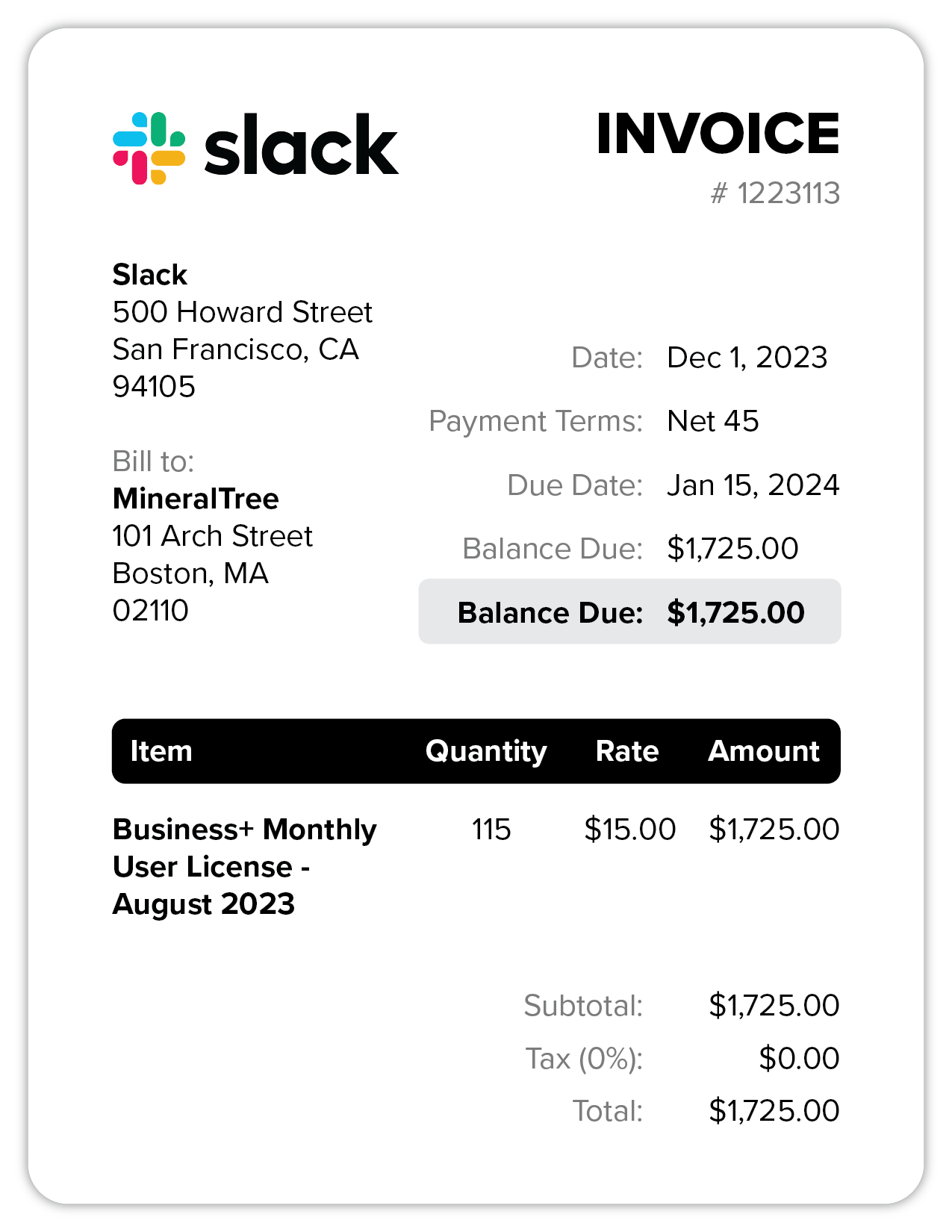
| Description | Qty | Price | Total |
|---|---|---|---|
| Business+ Monthly User License - August 2023 | 115 | $ 15.00 | $ 1725.00 |
Automate Invoice Processing in 3 Steps
Transform chaotic vendor bills and PDF invoices into structured Accounts Payable data in seconds—no manual keying or template setup required.
1. Upload Your Invoice
Upload PDF invoices, scanned paper documents, or mobile photos (PNG, JPG, WEBP), press Ctrl+V to paste a screenshot, or test one of the 3 real sample invoices.
2. AI Extracts Complete Invoice Data
Our PaddleOCR-VL-1.6 vision engine scans the document layout and captures vendor details, invoice #, PO #, due dates, payment terms, line items (item, qty, unit price, total), and taxes automatically.
3. Download or Integrate Your Data
Review or edit any cell in the interactive AP table, then export structured data as Excel (.XLSX), CSV, or JSON—ready for QuickBooks, Xero, SAP, or Google Sheets.
Enterprise-Grade Invoice OCR & Accounts Payable Automation
Stop spending hours typing vendor bills into accounting spreadsheets. Utilvo's AI Invoice OCR Scanner combines deep visual layout recognition with an interactive Accounts Payable line-item editor so bookkeepers, AP clerks, and small business owners can capture every row, reconcile taxes, and export clean .XLSX, .CSV, and .JSON files in seconds.
Complete Line-Item Table Extraction
Automatically extracts multi-row product descriptions, SKU codes, quantities, unit prices, and line-item totals into an interactive editable grid.
Vendor, Client & PO Number Detection
Captures supplier names, billing addresses, tax IDs, invoice numbers, purchase order (PO) references, and payment terms (Net 30, Net 45, Due on Receipt).
Multi-Tax, VAT & Discount Reconciliation
Separates subtotals, sales tax/VAT percentages, shipping charges, and discounts while automatically verifying line-item math against the invoice grand total.
5 Multi-Format Views (AP Grid, Rendered, JSON, Raw, Layout)
Switch seamlessly between an editable AP Line-Item Grid, Rendered HTML Tables, ERP-ready JSON, Raw Markdown, and AI Bounding-Box Layout Visualization.
1-Click Export to Excel (.XLSX), CSV & JSON
Download formatted Excel workbooks, QuickBooks/Xero-compatible CSV spreadsheets, or structured JSON payloads for SAP, NetSuite, and ERP workflows.
Dual Privacy Switch (Zero-Retention Cloud or 100% On-Device)
Choose between encrypted stateless AI Cloud Mode (zero file storage) for complex multi-row tables or 100% On-Device Browser Mode so sensitive invoices never leave your device.
Intelligent Invoice Processing for Every Business
From Accounts Payable clerks to CPA firms and CFOs, our Invoice OCR eliminates manual data entry bottlenecks across every billing workflow.
AP Clerk Productivity
Processing 300+ monthly vendor invoices manually takes 40+ hours. Scan each invoice in seconds to extract vendor, invoice #, line items, and totals automatically—cutting a week's AP workload down to a single afternoon.
Small Business Payments
Track supplier payment terms (Net 30, Net 45) and due dates effortlessly. Capture every contractor and inventory bill as it arrives so you avoid late fees and maintain accurate cash-flow visibility.
Client Bookkeeping & CPAs
Onboarding a client with months of backlog invoices? Extract itemized rows and tax breakdowns directly into QuickBooks-ready CSV and formatted Excel (.XLSX) workbooks in minutes instead of days.
ERP & JSON Data Integration
Export clean, schema-consistent JSON objects containing vendor metadata and line-item arrays to feed directly into SAP, Oracle NetSuite, Microsoft Dynamics, or custom accounting pipelines.
Invoice OCR Comparison: Utilvo vs. DeepSeek OCR vs. Enterprise AP Tools
See how Utilvo delivers true structured line-item extraction and native Excel/CSV/JSON exports without Captchas or enterprise paywalls.
| Capability / Feature | Utilvo Invoice OCR | DeepSeek Invoice OCR | Nanonets / Rossum | ParserBee / DocuGenie |
|---|---|---|---|---|
| 100% Free & No Account Signup | Yes (Unlimited) | Yes | Work Email / Demo Required | Limited Free Credits |
| Zero Captcha Verification | Instant (No Captcha) | Turnstile Captcha Every Scan | Login Required | Login / Rate-Limited |
| Interactive Editable Line-Item Grid | Live Editable AP Grid + Auto-Math | Static Markdown Only | Yes (Paid Tier) | Yes |
| Native .XLSX, .CSV & .JSON Export | 1-Click .XLSX, .CSV & .JSON | Copy Raw Text Only | Yes | Yes |
| Multi-Format Output Tabs | 5 Tabs (AP Grid, Rendered, JSON, Raw, AI Layout) | 2 Tabs (Rendered & Raw Text) | 2–3 Views | 2 Views |
Invoice OCR Automation Questions Answered
What invoice data can your AI Invoice OCR extract automatically?
Our PaddleOCR-VL-1.6 vision engine extracts vendor name and contact info, customer/Bill-To details, invoice number, PO number, issue date, due date, payment terms (such as Net 30 or Net 45), complete line-item tables (item, description, quantity, unit price, and line amount), subtotal, tax/VAT, discounts, and grand total.
How does Utilvo Invoice OCR compare to DeepSeek Invoice OCR, Nanonets, and ParserBee?
While DeepSeek Invoice OCR only provides raw text/markdown without an editable line-item grid or native Excel (.XLSX) export—and forces a Captcha before every scan—Utilvo provides 5 interactive views including an editable Accounts Payable grid, live math recalculation, AI layout bounding boxes, and 1-click downloads to Excel (.XLSX), CSV, and JSON with zero Captchas and no signup.
Can I edit the extracted invoice fields and line items before exporting to Excel?
Yes. Every header field (Vendor, Client, Invoice #, Issue Date, Due Date, Payment Terms) and every cell in the extracted Line Items table (Item, Description, Qty, Unit Price) is live-editable. Updating a quantity or unit price automatically recalculates the line total, subtotal, and grand total before you download your .XLSX or .CSV file.
How does AI handle different invoice templates and layouts without rules?
Traditional OCR relies on rigid positional templates that break whenever a vendor changes their invoice layout. Our Vision-Language model (PaddleOCR-VL-1.6) understands visual document structure, table headers, and semantic key-value pairs across any commercial, SaaS, contractor, or wholesale invoice template automatically.
Can I import the extracted invoice data into QuickBooks, Xero, SAP, or Google Sheets?
Yes. Click 'Excel (.XLSX)' for Microsoft Excel and Google Sheets, 'CSV' for direct import into QuickBooks Online, Xero, Wave, or Zoho Books, or '.JSON' to feed structured line-item arrays into SAP, Oracle NetSuite, or custom ERP webhooks.
Does the Invoice OCR scanner support both PDF invoices and phone photos?
Yes. You can upload native or scanned PDF invoices, drag and drop PNG, JPG, or WEBP photos, paste an image URL, or press Ctrl+V to paste a screenshot directly from your clipboard.
What languages and currencies does the Invoice OCR support?
Our vision OCR engine recognizes invoices across major international languages and scripts (including English, Arabic, Spanish, French, German, Chinese, and Japanese) and detects major currency symbols including USD ($), EUR (€), and GBP (£).
Is Utilvo Invoice OCR completely free for small businesses and bookkeepers?
Yes. Utilvo Invoice OCR is 100% free with unlimited scans, no account registration, no credit card, and no watermark on exported Excel, CSV, or JSON files.
Explore More Specialized OCR Tools
Receipt OCR Scanner
Batch scan thermal store receipts and expense slips into an Excel ledger.
Table OCR Extractor
Extract complex multi-column tables from financial scans into Excel and CSV.
Invoice PDF to Excel
Convert native vector PDF invoices directly into formatted .XLSX sheets.
Invoice Generator
Create and download professional itemized PDF invoices for your clients.
Math Formula OCR
Convert printed and handwritten equations into LaTeX, Markdown, and Word MathML.
Passport & ID OCR
Extract and verify Machine Readable Zone (MRZ) data from passports and IDs.