Lossy vs Lossless Compression: Technical Guide with Screenshots
Every digital asset transmitted over the modern web relies on compression algorithms to eliminate redundancy. However, the fundamental mathematical trade-off between lossy (irreversible psychovisual quantization) and lossless (reversible entropy coding) determines whether an image maintains pixel-perfect fidelity or slashes payload weight by over 80%. This engineering tutorial breaks down how DCT, quantization matrices, DEFLATE, and modern hybrid formats (WebP and AVIF) operate in browser memory.
Utilvo runs image quantization and lossless filtering directly in your browser memory using HTML5 Canvas and WebAssembly. No files are ever sent to remote server disks.
Why Client-Side Image Compression Improves Privacy
Standard cloud compression platforms require users to upload confidential business diagrams, internal product roadmaps, or family archives across WAN connections to remote server farms. Those assets are placed into processing queues where unmonitored server scripts write temporary copies onto shared cloud storage volumes.
Utilvo removes server exposure entirely. By executing quantization and entropy encoding locally via WebAssembly, your machine allocates private memory buffers inside the browser process. Because the processed document is generated locally in your browser, there is no need to upload the processed document to a remote server before downloading it, eliminating security concerns and network transfer delays.
Step 1: Selecting Quality Profiles, Quantization Sliders, and Formats
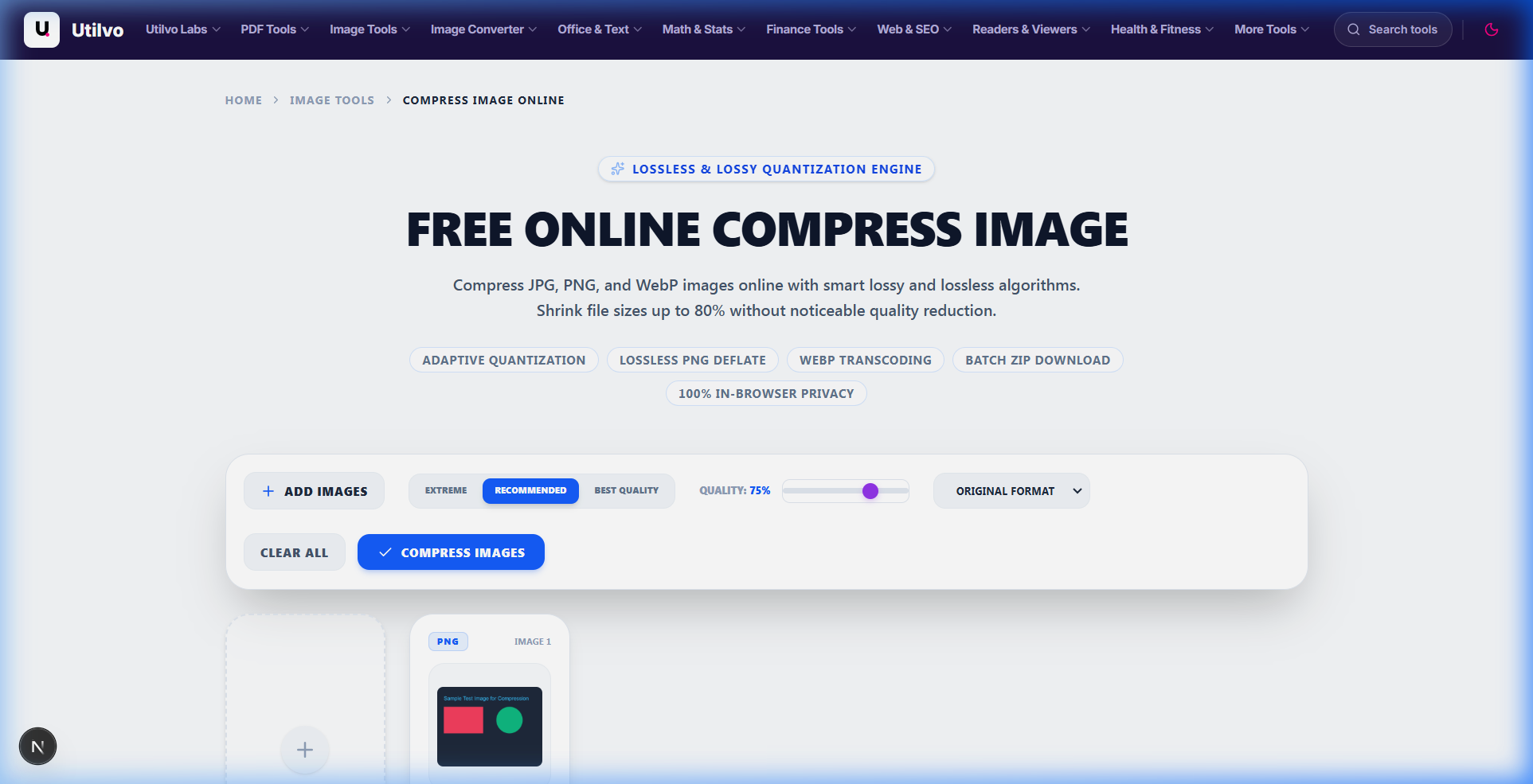
Open the Compress Image tool. Import your target raster graphic. The workspace gives you immediate access to quality presets (Extreme, Recommended, Best Quality), manual percentage sliders, and modern WebP transcode options.
How Lossy Compression Operates
Lossy algorithms (JPEG, lossy WebP, AVIF) divide images into frequency blocks via Discrete Cosine Transform (DCT). Human vision is far more sensitive to subtle brightness variations (luminance) than subtle color changes (chrominance). Lossy encoders exploit this by performing chroma subsampling (e.g. 4:2:0) and discarding high-frequency coefficients that the human eye cannot discern at standard viewing distances.
How Lossless Compression Operates
Lossless algorithms (PNG, GIF, lossless WebP) preserve every single bit. They use predictive filtering combined with DEFLATE (LZ77 dictionary encoding + Huffman coding) to replace repeated color sequences with compact tokens. When uncompressed, the output is mathematically identical bit-for-bit to the master file.
Step 2: Inspecting Real-Time Space Savings and Downloading Optimized Files
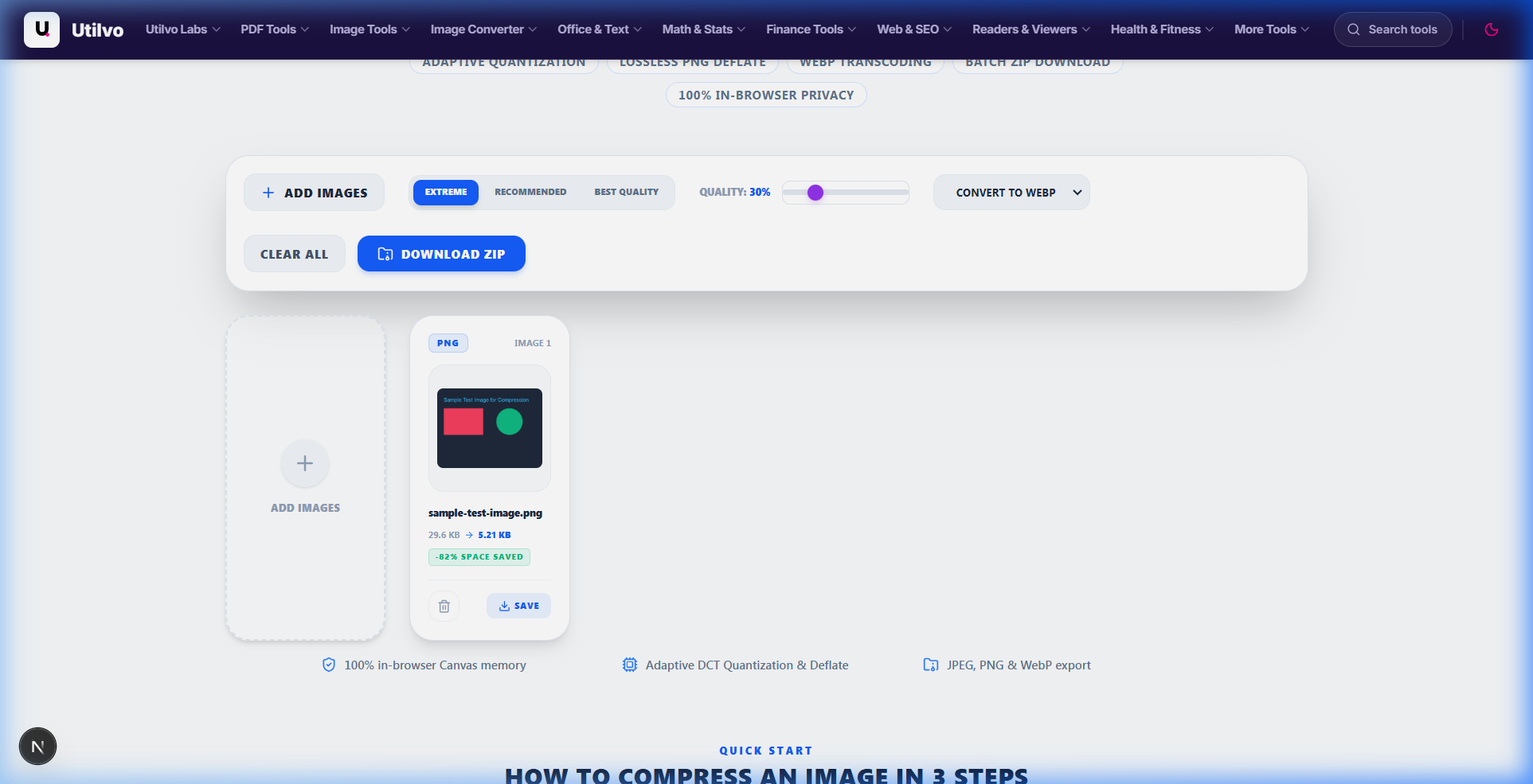
Once compression completes, the engine displays an exact before-and-after comparison. Notice how converting an uncompressed PNG graphic into modern WebP achieves up to an 82% file size reduction with pristine visual fidelity.
Photographs: Choose Lossy
Natural continuous-tone photographs compress poorly with lossless algorithms. Lossy WebP/JPEG delivers 70% to 90% savings without visible artifacts.
Screenshots: Choose Lossless
High-contrast text, UI screenshots, and logos suffer from ringing artifacts when compressed with lossy algorithms. Use lossless PNG or lossless WebP.
PDFs: Hybrid Approach
PDFs pair lossless vector outlines and font streams with lossy JPEG photo streams. Recompressing raster images saves up to 80% total PDF size.
Technical Architecture Comparison: Local vs. Cloud Compression
Evaluating the operational differences between browser-native WebAssembly compression and legacy remote server queues:
| File handling | Utilvo | Server-based converters |
|---|---|---|
| File upload | Files remain in your browser | Files are uploaded to a remote server |
| Processing | Client-side (WebAssembly / browser memory) | Server-side queue |
| Download | Generated locally in memory | Processed file returned from server |
| File privacy | No file upload to Utilvo servers | Files stored temporarily on remote disk |
| Document limits | Generous limits bound by available device memory | Frequently capped by 25MB or 50MB file size paywalls |
Lossy vs Lossless: Engineering Decision Matrix
Use this reference table to evaluate which compression algorithm best fits your distribution channel:
| Attribute | Lossy Compression | Lossless Compression |
|---|---|---|
| Data Retention | Permanently discards imperceptible data | Preserves 100% bit-for-bit optical fidelity |
| Typical Payload Reduction | 70% to 92% | 20% to 55% |
| Optimal Use Cases | Website hero banners, eCommerce photos, email attachments | UI screenshots, logos, vector icons, legal documents, master archives |
| Common Formats | JPEG, WebP (lossy), AVIF (lossy) | PNG, WebP (lossless), AVIF (lossless), GIF, TIFF |
| Generational Degradation | Degrades with every re-save cycle | Zero degradation regardless of save count |
Common Compression Pitfalls and How to Avoid Them
Three critical mistakes developers and designers frequently make when balancing file size and visual quality:
1. Compounding Generational Loss from Repeated Re-Encoding
Opening a JPEG, applying a crop, and saving it back as a JPEG runs another DCT quantization cycle. Over 3–5 save cycles, ringing artifacts around sharp transitions multiply, producing blurred typography. Always edit from a lossless master (PNG/TIFF) and only export lossy derivatives as a final release step.
2. Forcing High-Resolution Photographs into PNG Containers
Storing complex camera photographs in PNG format leads to massive 6 MB–12 MB files that crush mobile download bandwidth. Lossless algorithms cannot compress noisy continuous optical gradients efficiently. Always transcode natural photos to lossy WebP, AVIF, or JPEG.
3. Applying Aggressive Lossy Compression to UI & Text Screenshots
Software dashboards, diagrams, and typography contain sharp high-frequency edges. Applying lossy DCT compression creates mosquito noise and blurred letters around text boundaries. Use lossless PNG or lossless WebP for screenshots to keep lines razor-sharp.
Frequently Asked Questions
Clear, technically sound answers to common digital compression questions.
Can I convert a lossy image back to lossless quality?
No. Once optical high-frequency data is discarded through lossy quantization, it is permanently lost. Transcoding a JPEG into a PNG simply wraps the existing quantized pixel data inside a lossless container; it cannot reconstruct missing detail. Always archive uncompressed raw masters before generating lossy production assets.
Is WebP compression lossy or lossless?
WebP natively supports both compression modes within a unified container. Lossy WebP utilizes VP8 intra-frame predictive coding, reducing payload weight by 25% to 34% compared to baseline JPEG. Lossless WebP employs advanced spatial transformation, color indexing, and entropy coding, producing files roughly 26% smaller than standard PNG.
What type of compression is used inside PDF documents?
PDF documents utilize a hybrid architecture. Typography, structural vector coordinates, and forms use lossless Flate (zlib/DEFLATE) streams. Embedded raster graphics can utilize either lossless Flate/JBIG2 encoding (for line art and scanned text) or lossy DCT/JPEG recompression (for photographic figures and full-page scans).
Why are PNG files significantly larger than JPG files?
PNG is strictly a lossless format that preserves 100% of bit-for-bit optical fidelity across all color channels. For complex photographic scenes containing continuous gradients and optical sensor noise, lossless entropy coding cannot reduce byte weight significantly, making PNG files 5 to 10 times heavier than psychovisually quantized JPEGs.
What is generational loss in digital image compression?
Generational loss is the progressive degradation in visual quality caused by repeatedly decompressing, editing, and re-saving lossy image files. Each encoding pass runs Discrete Cosine Transform quantization, multiplying compression artifacts, creating edge ringing, and muddying color transitions.
Related tools
Compress Image
Reduce image file size up to 90% without visible quality loss using smart compression.
Convert Image
Convert between JPG, PNG, WebP, AVIF, and 20+ formats directly in your browser memory.
Resize Image
Change pixel dimensions with precise control and Lanczos3 anti-aliasing.
Compress PDF
Reduce PDF file size for email and web uploads without compromising text sharpness.
Related guides
JPG vs PNG vs WebP vs AVIF: Which Image Format to Use
A comprehensive benchmark of modern image formats covering compression efficiency, browser support, and optimal workloads.
How to Optimize Images for Web Performance
Master WebP and AVIF formats, psychovisual quality settings, and responsive image syntax to slash LCP and page load times.
How to Convert HEIC Photos to JPG
Convert iPhone HEIC and HEIF photos to universally compatible JPG in your browser with full EXIF retention and zero uploads.